Lock on.Stay smooth.
PowerAim runs a real-time YOLOv8 model on your screen and nudges the aim toward the target — with persistent multi-target tracking, adaptive smoothing, gamepad output, OCR triggers and an LLM-driven AutoPlay. Free, source-available, no key system.
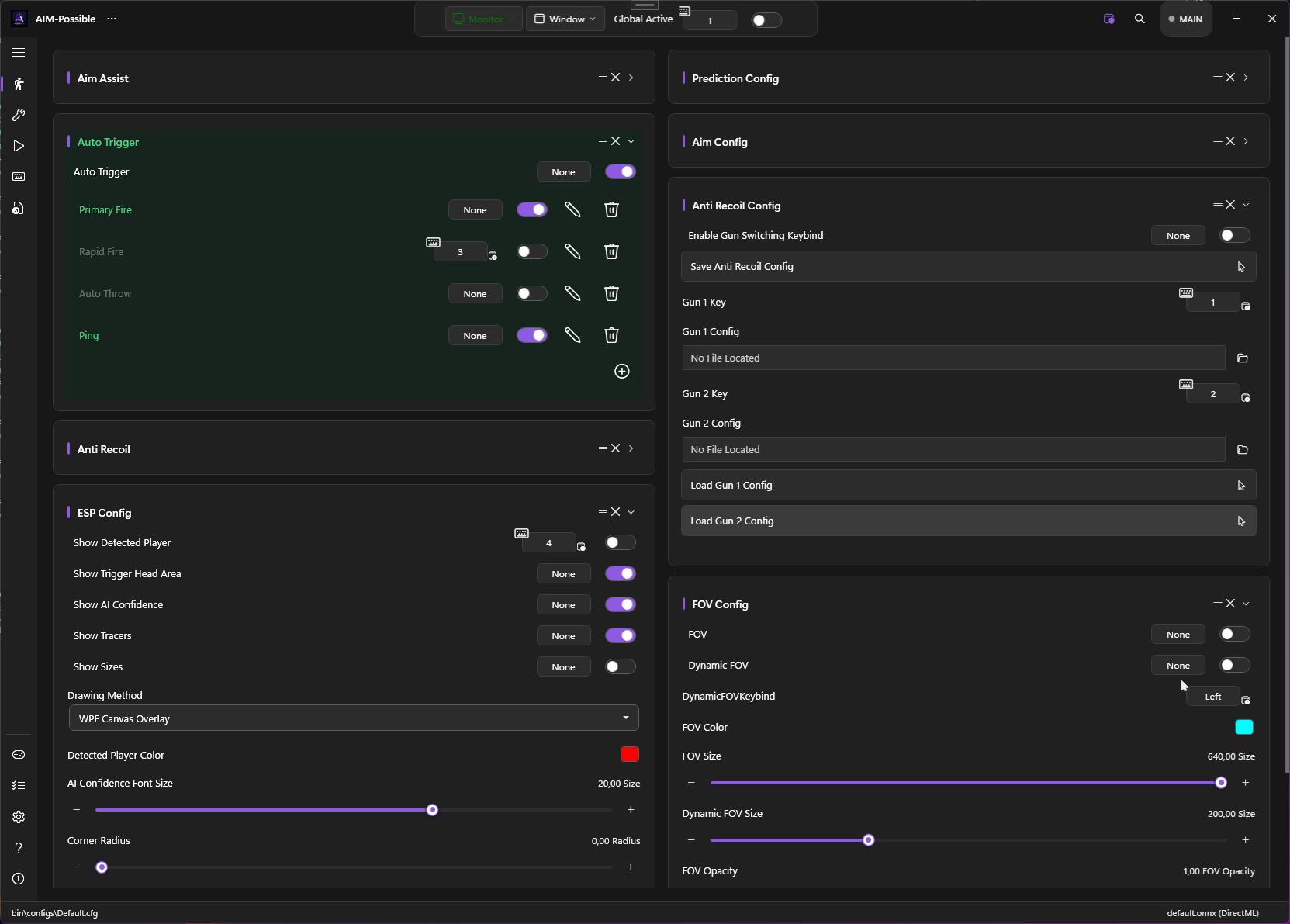
It reads the screen, not the game — so it isn't tied to a single title. The same setup works in Call of Duty, Battlefield, Apex, Fortnite and just about anything else.
Built like a tool, not a toy.
A decoupled service architecture, a real Fluent UI, and a capture → inference → control pipeline that you can tune end to end.
Profile-based aim
Every aim setting lives on a profile — run several at once, each on its own key, calibrated to your real sensitivity so it feels the same in any game.
Adaptive smoothing
Per profile: None, EMA, or an adaptive 1€ filter — steady when slow, responsive on flicks — with optional SORT-style tracking and prediction.
Gamepad in & out
Aim on a virtual Xbox stick via ViGEm, or map controller ↔ keyboard both ways with per-profile hotkeys and presets.
OCR HUD reader
Read ammo, health or weapon names off the HUD and gate triggers or auto-switch profiles on AND/OR condition trees.
LLM AutoPlay
Feed detections + OCR context to a local Ollama model and let it drive scripted actions with cooldowns and a learning mode.
Anti-recoil profiles
Record real recoil patterns and replay them, or use image-based compensation — all per-profile with hotkey & OCR activation.
Dynamic tools
Build your own tools from move / click / send-key / run-exe / delay steps with option variables — each on a start key, next to the Magnifier and HWID spoofer.
One keybind system that ties it all together.
The quiet superpower. Any binding can be a chord across keyboard, mouse and gamepad at once — even something like Ctrl + Q + Gamepad LT — and you can bind almost anything: a toggle, an aim / trigger / mapping profile, a custom tool, or a whole config. Combine them and a single key builds complex, game-specific workflows.
Mix every device
Hold the combination, release to record. Ctrl+Shift+X, Ctrl+Left-Click, X+B on a pad, or cross-device like Ctrl+Q+LT — it fires only while every part is held.
Switch anything by key
Every toggle, profile and tool has its own hotkey chip — click it, record a key or chord, done. Flip Aim Assist, arm a trigger, enable a mapping or start a tool mid-game without alt-tabbing.
Build complex flows
Chain it: one chord loads a config that brings its own tools, triggers and profiles; another toggles a weapon setup; a third runs a multi-step tool. Keys + configs + tools + triggers = almost anything.
It never touches the game.
PowerAim works entirely from the outside — it watches the screen and moves your input devices. It does not read or write game memory, inject code, or load a kernel driver, and everything it draws — every window and overlay — stays out of screen recordings.
No hooks, no driver
It reads the screen through the OS desktop-duplication API — the same one OBS uses — and never attaches to, hooks, or reads the memory of the game process. Nothing is injected.
Just your devices
Output is ordinary mouse, keyboard and virtual-controller input — the same kind your real hardware sends. It can even route moves through your Razer, Logitech or ddxoft mouse driver.
Invisible to recorders
Everything PowerAim draws — the main window, every dialog and the crosshair / FOV / ESP overlays — is excluded from screen capture (WDA_EXCLUDEFROMCAPTURE), so OBS, Discord screen-share, recorders and capture-based tools see nothing of it. On by default.
Don't rent your aim.
You can pay a recurring subscription for a single-purpose aim tool — or use PowerAim, which does far more, for free.
A subscription, for aim alone
Single-purpose tools like NobleAim charge a recurring fee — mostly for aim and a trigger, closed-source, with the meter always running.
Get far more, for nothing
Aim profiles, triggers, anti-recoil, OCR, gamepad in & out, LLM AutoPlay, custom tools and the overlays — free and source-available, 100% local, no key system, no paywall, no ads.
Three ways to run it.
Not sure? Grab the Installer — it sets everything up. Pick a zip if you prefer a portable build.
DirectML runs on virtually any GPU (AMD, Intel, NVIDIA) and is the safe default. CUDA is fastest but needs an NVIDIA card with the CUDA runtime. Both are the same app — only the inference backend differs.
Every version, every change.
Live from GitHub — what shipped, when, and how many times each build was downloaded.