Training Your Own Model
You can train a YOLOv8 model on your own labelled data and export it to ONNX for PowerAim. PowerAim picks up dynamic input shapes and multi-class metadata automatically.
This page is the short, opinionated version. For a full walkthrough, see the video tutorial linked at the bottom.
The pipeline
Capture frames → Auto-label / hand-label → Train YOLOv8 → Export to ONNX → Drop into bin/models/
1. Capture frames
PowerAim ships built-in capture for training data:
- Settings → Collect Data While Playing — saves capture frames to disk while you play
- Settings → Auto-Label Data — additionally writes a YOLO
.txtlabel file from the current model’s detections (the “auto-label” trick)
For a fresh class with no existing model, just capture frames manually. The Replay Buffer is also a quick way to grab clean frames.
In-app training-data capture
Together these two toggles bootstrap a dataset you can curate and retrain on — no separate recorder needed.
Collect Data While Playingsaves capture frames as JPEGs tobin\images\while the AI loop runs. Frames are throttled to roughly a couple per second (the save is rate-limited to at most one frame every 500 ms), so a play session yields a steady trickle of varied images rather than a flood of near-duplicates.Auto-Label Data(in addition toCollect Data While Playing) writes a matching YOLO-format label file tobin\labels\for each saved frame, named to match its image. The label is derived from the primary (nearest-to-centre) detection of the model that is currently loaded.
Each label file holds one line in the standard YOLO format — <class-id> <x-center> <y-center> <width> <height> — with the box coordinates normalized to the frame size.
Auto-labels are only as good as the model that produced them. Treat them as a head start: load the captured bin\images\ and bin\labels\ into a labelling tool, fix the misses, and add classes the current model can’t see yet before you retrain.
2. Auto-label with MakeSense.ai
The repo includes a TFJS export under Universalv3_web_model/ specifically for auto-labelling new data via MakeSense.ai:
- Open makesense.ai
- Load your captured images
- Pick Object Detection as the task
- Choose AI / YOLOv5 (TensorFlow.js) under the AI assistant
- Upload the
Universalv3_web_model/files - Run the model — most of your frames get auto-labelled
- Hand-correct the obvious misses
Export labels in YOLO format.
3. Train YOLOv8
Use Ultralytics’ YOLOv8 trainer. Minimal example (Python):
from ultralytics import YOLO

# Start from a pretrained checkpoint
model = YOLO("yolov8n.pt")  # or yolov8s.pt / m / l / x depending on GPU

model.train(
    data="dataset.yaml",   # standard YOLO dataset config
    epochs=100,
    imgsz=640,
    batch=16,
    name="poweraim-model",
)
A typical dataset.yaml:
path: ./dataset
train: images/train
val: images/val

names:
  0: Enemy
  1: Teammate
PowerAim reads the names field from ONNX metadata, so multi-class models work out of the box.
4. Export to ONNX
model.export(format="onnx", dynamic=True, simplify=True)
Key flags:
dynamic=True— exports with dynamic axis. PowerAim respects this and lets users pick image size at runtime.simplify=True— strips redundant ops. Smaller file, faster load.opset=12or higher — matches what ONNX Runtime expects.
The exported file lands as runs/detect/poweraim-model/weights/best.onnx.
5. Drop into PowerAim
Copy best.onnx into <PowerAim install>\bin\models\ (rename to something descriptive — MyGame_v1.onnx).
Restart PowerAim or click refresh on the Models tab — your new model appears in the local list. Click to load.
Tips for high-quality models
- Use a YOLOv8 architecture. PowerAim’s inference pipeline is built around YOLOv8’s anchor-free output. Other YOLO versions may work but are not officially supported.
- Input size 192 to 1280, multiple of 32. PowerAim auto-detects this from metadata.
- Multi-class support. List class names in the
namescustom metadata field. - Thousands of varied images. Different maps, weapons, lighting, view angles. Detection quality is bottlenecked by training data, not by inference.
- Test in-game with
Show Detected Playerenabled. Verify class confidences are reasonable (>= 0.5 for clear targets).
Video walkthrough
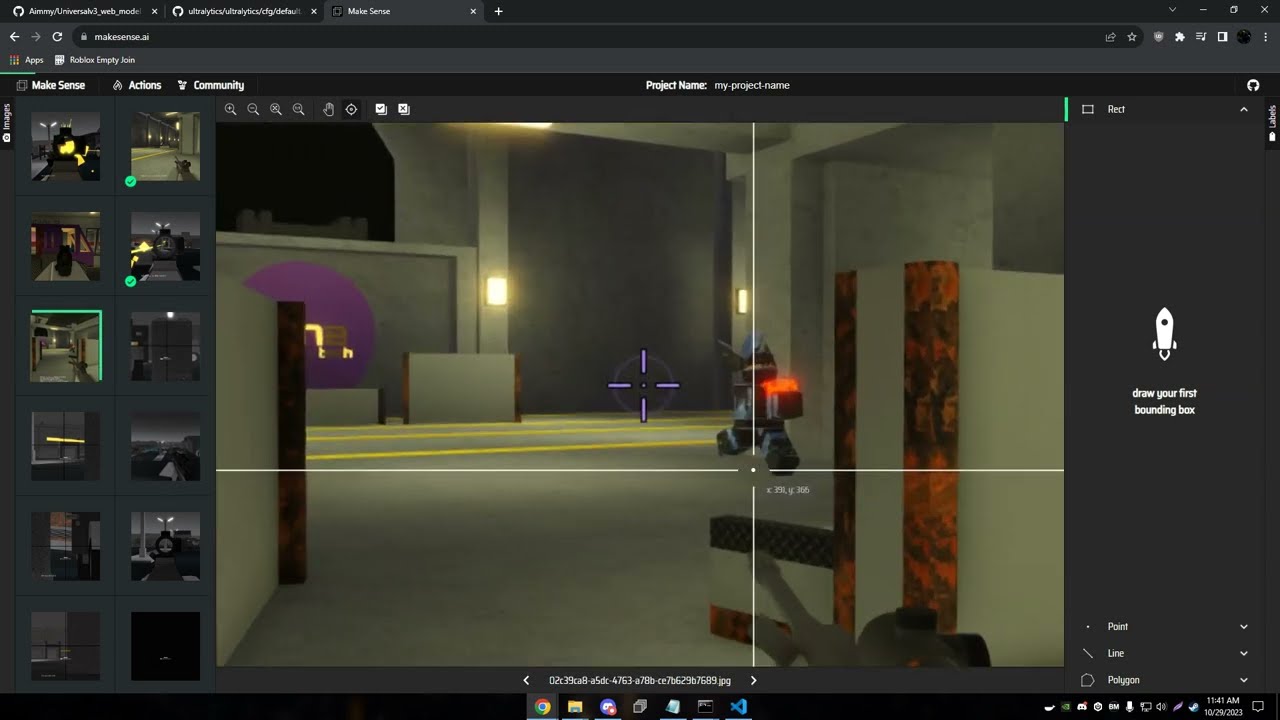
A short walkthrough video showing the MakeSense.ai labelling → YOLOv5/8 training → PowerAim drop-in workflow.
See also
- Using Models — switching, benchmarking, image-size override
- Contributing Models — share your model with the community